 Dipper Field
Every position Dipper Field measures comes with an estimate of how far off it may be. The estimate comes from the phone or the receiver. The actual error may be larger.
Where you see it
- While you record. Under Use my location, a status line and the estimate, for example Estimated position error: 12 ft.
- On the map. Tap your position marker to open My location. It shows your coordinates, the estimated error and, where available, the satellite sky plot.
- After you take the position. The form says how good it was, for example Using your position (about ±12 ft).
- On the receiver screen. With a receiver connected, open Settings and tap Location source. The status at the top shows the receiver's estimate, and Location details shows the rest.
Tap your position marker on the map.
My location opens with your coordinates and Estimated position error.
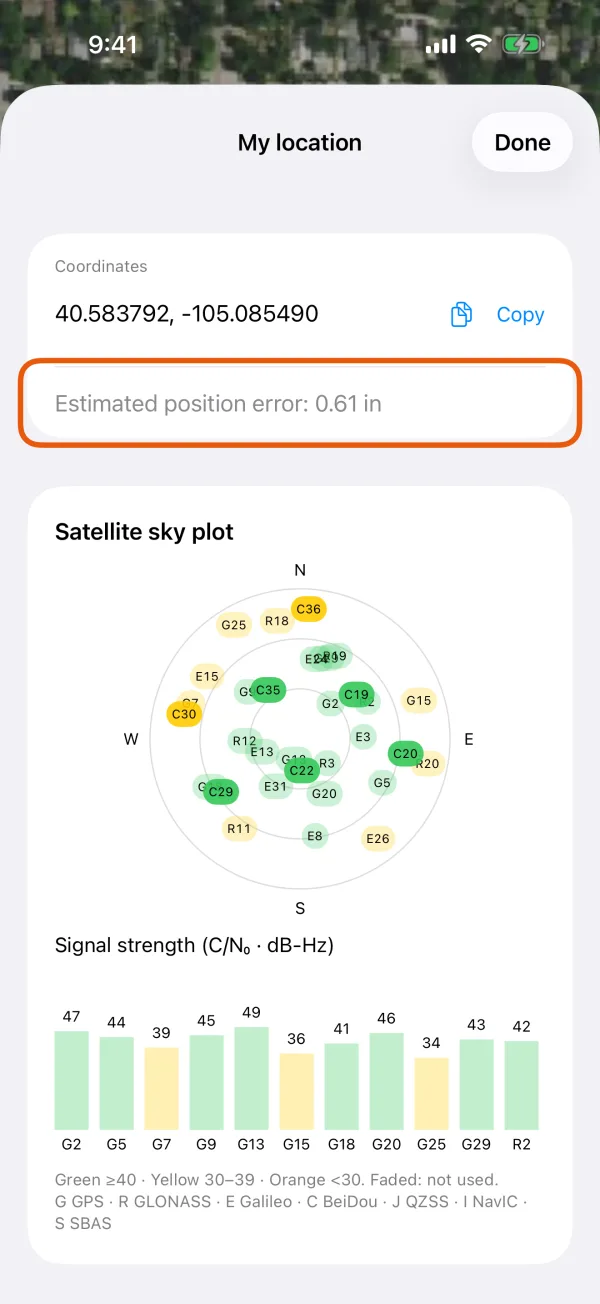
My location, with the estimated position error marked. Scroll down to Satellite sky plot.
On Android it shows the phone's own satellites, or the receiver's while a receiver is in use. On iPhone and iPad it appears only while a receiver is in use.
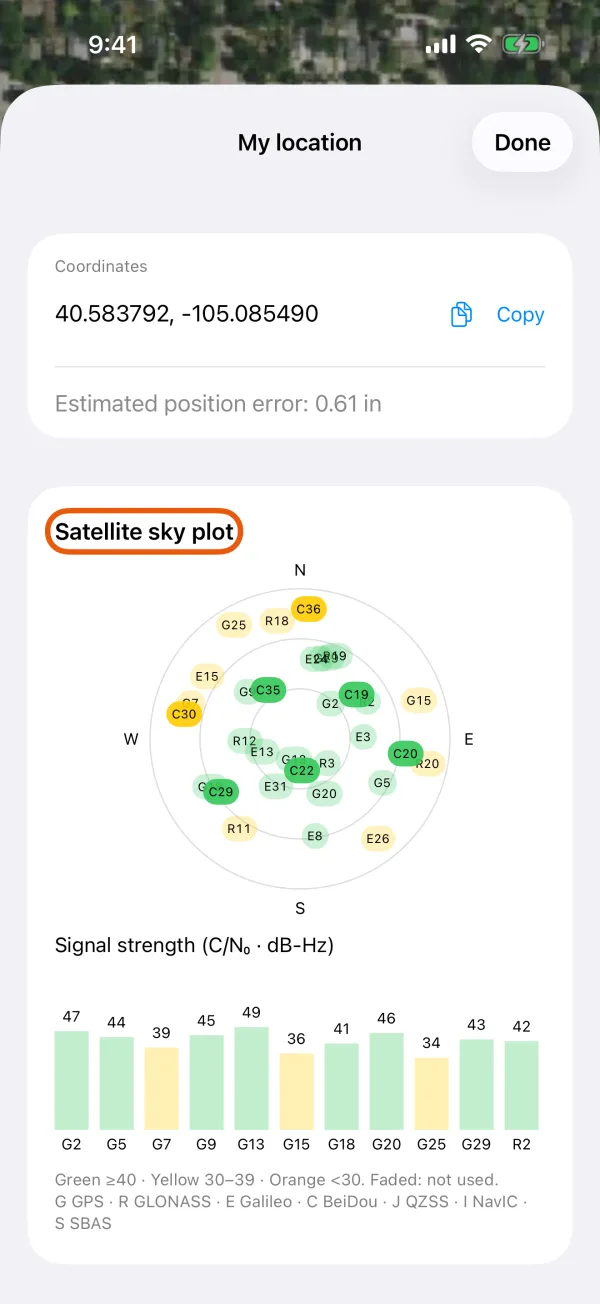
The satellites in view, with their signal strength.
What the status line means
| Status | What it means |
|---|---|
| Location available | There's a current position with an error estimate. |
| Location accuracy too low | The estimate is worse than the Location accuracy set for this record type. See record only with RTK fixed. |
| Getting location… | There's no position yet. |
| Location updates stopped | No new position has arrived for 30 seconds. |
| Position error unknown | Positions arrive, but without an error estimate. |
| Waiting for RTK fixed | Record only with RTK fixed is on and the receiver isn't fixed. The current estimate still shows, so you can watch it settle. |
The line waits a few seconds before it switches between Location available and Location accuracy too low, so one jumpy reading doesn't make it flicker. The numbers update live.
Units
The estimate follows Distance unit in Settings, under Measurement units:
- Feet, Yards or Miles: inches below a foot, feet above, for example 4.2 in or 12 ft.
- Meters or Kilometers: centimeters below a meter, meters above, for example 2.1 cm or 3.5 m.
- Automatic: follows your phone's region. In the United States that's feet.
The receiver screen is the exception: it always shows meters, as receivers report them.
Position types
With a receiver connected, Position type under Location details on the receiver screen says what kind of position the receiver has:
| Position type | What it means |
|---|---|
| No position | The receiver hasn't worked out a position yet. |
| Standard | The receiver on its own, without corrections. Typically good to several feet. |
| Differential | Corrected by a differential service, such as SBAS. |
| RTK float | RTK corrections are arriving, but the solution isn't resolved yet. Typically within a few inches to a foot or so. |
| RTK fixed | RTK is resolved. Typically within an inch. |
Some receivers report other types, such as PPP. The phone's own GPS has no position type.
Estimated height error is shown beside the position error on the receiver screen, and on a saved record's elevation when the receiver reported one.
Read the satellite sky plot
| Position from | iPhone and iPad | Android |
|---|---|---|
| The phone's own GPS | Not shown. iOS doesn't share satellite data with apps. | My location |
| A receiver | My location, and Location details on the receiver screen | My location, and Location details on the receiver screen |
- The outer ring is the horizon, the center is straight overhead, and north is at the top.
- Each label is one satellite: G GPS, R GLONASS, E Galileo, C BeiDou, J QZSS, I NavIC, S SBAS.
- The color is the signal strength: green 40 dB-Hz and above, yellow 30 to 39, orange below 30. A faded label is a satellite not used in the position.
- The bars under the plot show each satellite's Signal strength (C/N₀ · dB-Hz).
What affects phone GPS
- Open sky. Buildings, trees and steep slopes block and reflect signals. Step away from them if you can.
- Time. Accuracy usually improves during the first minute or two after you start measuring.
- How you hold the phone. Hold it in front of you, not in a pocket or a vehicle.
- Precise location. Make sure precise location is allowed for Dipper Field. See allow location, camera and Bluetooth.
A phone is usually good to a few meters at best, which is around 10 ft. For more, connect a receiver.