 Dipper Field
Field data collection for iPhone, iPad and Android
Field data collection without the seat license.
Map assets, run inspections and fill in forms with photos — on maps that work offline, using your phone's GPS or your RTK receiver. Free, no account, and your data stays on your device.
- Free
- No account
- Works offline
- iOS 16+ · Android 9+
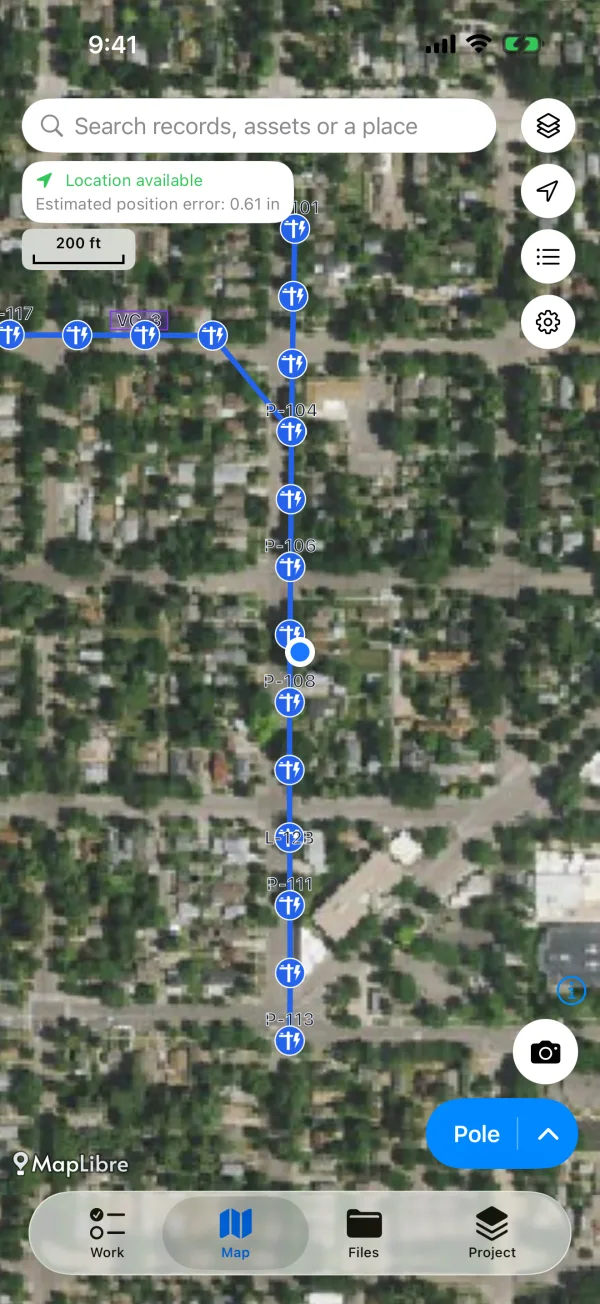
42 ready-made templates for
- Municipal infrastructure
- Transport and roads
- Electric power
- Construction
- Agriculture
- Field research
- Forestry and conservation
- Emergency and disasters
Why crews switch
The three things other field apps charge extra for.
Offline maps, free for good
Save areas of the map services you use, or import GeoPDF, GeoTIFF and MBTiles — USGS US Topo sheets included. Offline maps will never move behind a paywall.
Bring your RTK receiver
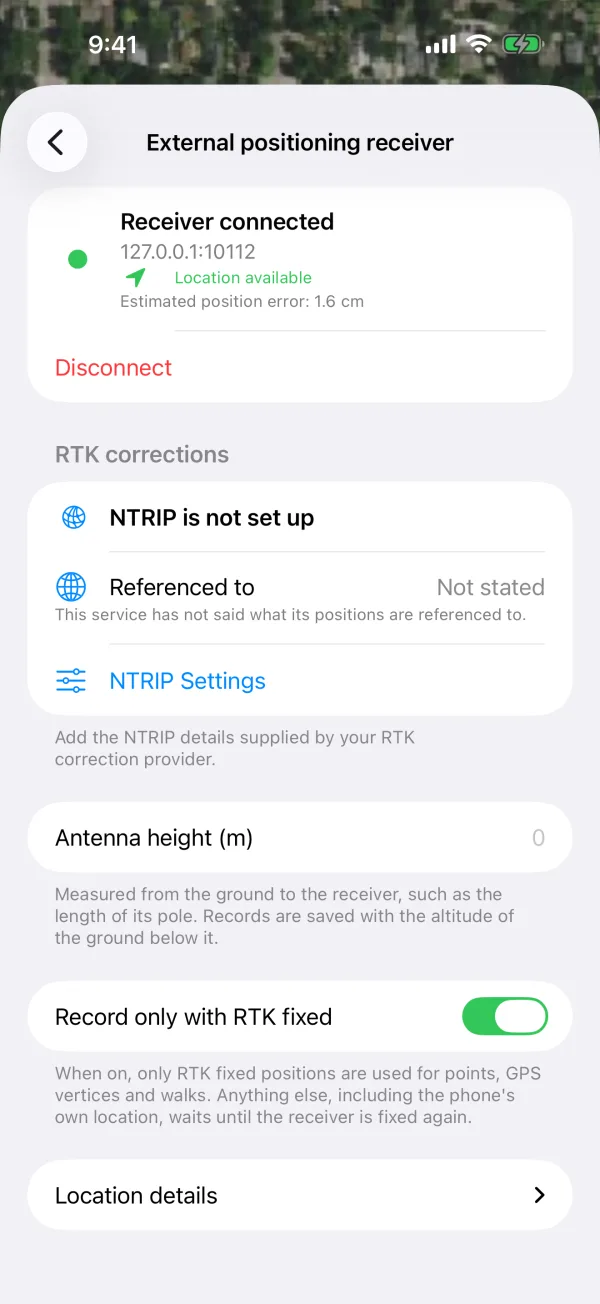
Connect over Bluetooth or Wi-Fi, stream corrections from your NTRIP caster, and record only when the receiver reports an RTK fixed solution.
Hand it off clean
Export GeoPackage, Shapefile, KML, CSV or a DXF package for CAD, and PDF reports with your logo — in formats desktop GIS and CAD tools already read.
Capture
A complete record in one pass.
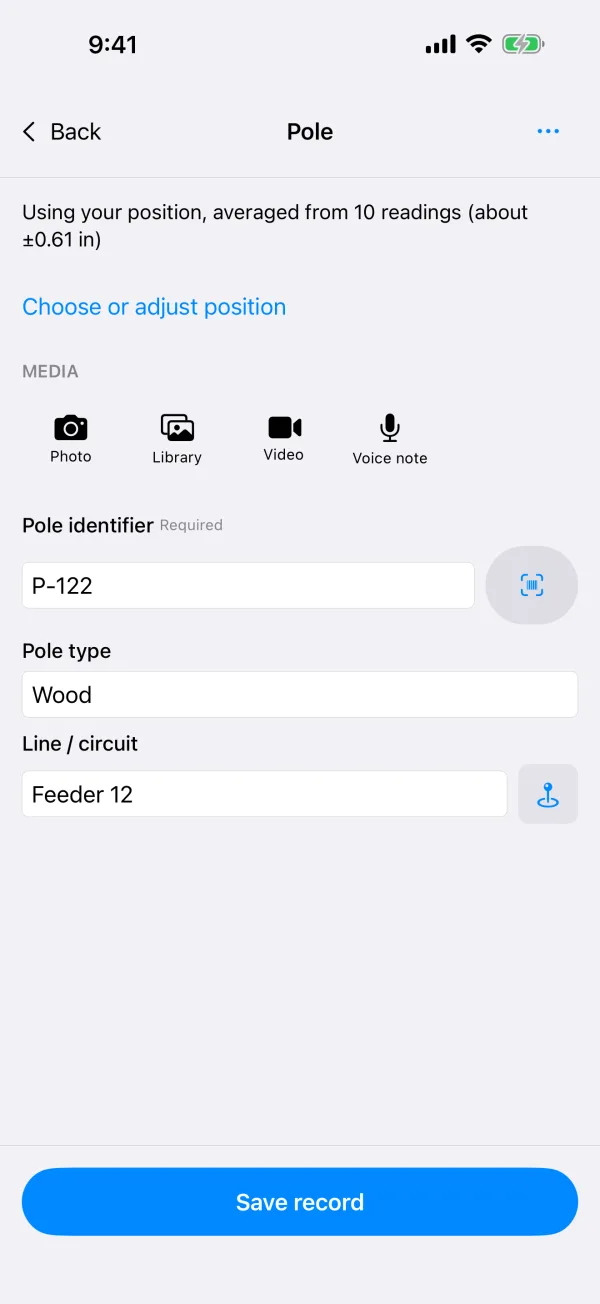
Place it, describe it, photograph it — and move on. Required answers and photo counts are checked before you leave the site.
- Points, lines and areas — tap the map, walk it with GPS (it keeps recording with the screen locked), or draw with a finger.
- Forms that think ahead — 11 answer types, questions that appear only when they apply, and fields that fill themselves in.
- Photo evidence — time, address and coordinates stamped on the photo, video with its GPS track, voice notes and markup.
- Scan to find — read a QR code or barcode to fill a field or jump straight to the asset.
Inspections
Rounds, rechecks and what's due.
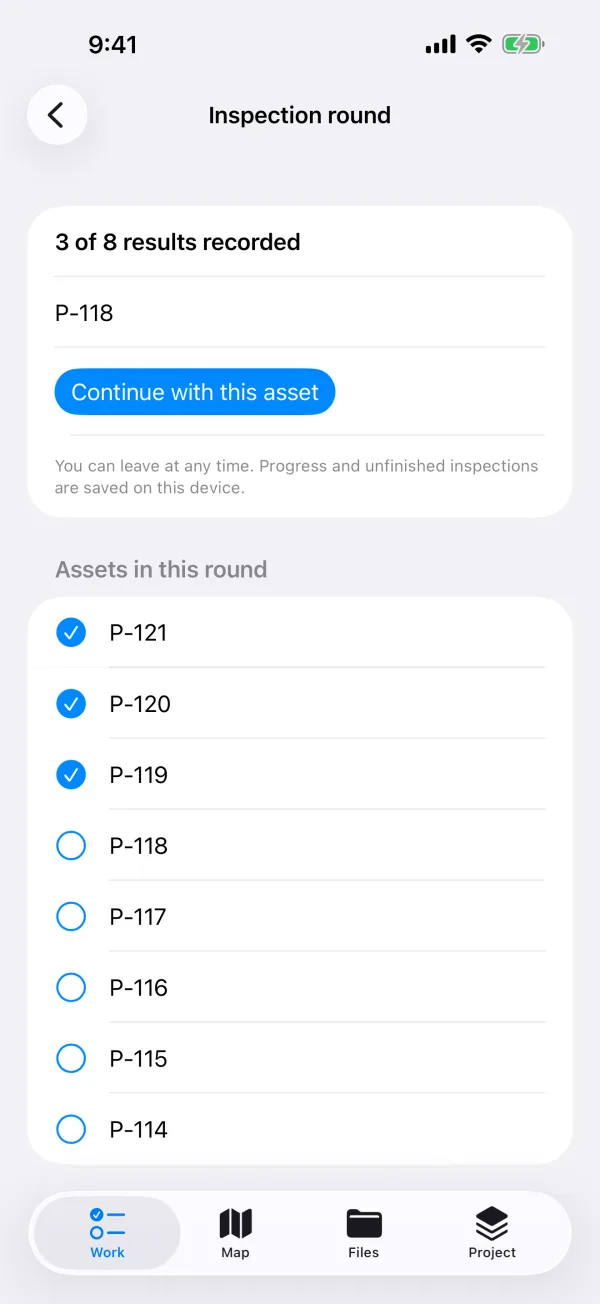
Work through a list of assets one by one, and keep every problem until someone confirms it's fixed.
- Inspection rounds of up to 500 assets: normal, problem found, skipped or unable to inspect — pause and pick up later.
- Problems stay open with a severity and their own location until a recheck closes them.
- Inspection intervals show which assets are due, and the compliance summary counts what's overdue.
- End of day — one summary of what was done, what was found and what's left.
Offline maps
Maps that work where the signal doesn't.
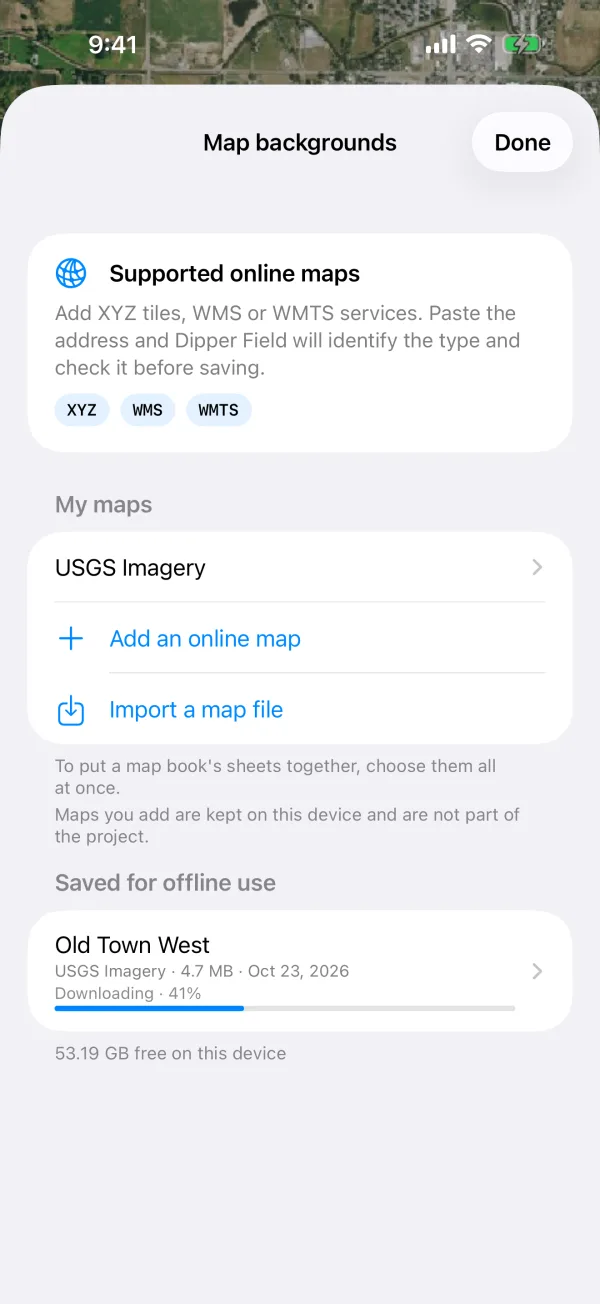
Save what you need before you head out, or bring the map files you already have. Free now, and it stays free.
- Save an area from your county's imagery or any XYZ, WMS, WMTS or ArcGIS tile service — Standard or Detailed.
- Import GeoPDF, GeoTIFF and MBTiles — from Avenza, ArcGIS, QGIS or TerraGo. A map book's pages and sheets become one map.
- USGS US Topo and FSTopo sheets are trimmed to the 7.5′ quadrangle, without the white collar.
- Plays by the rules — it tells you when a provider's terms don't allow saving a map offline, and suggests one that does.
RTK and coordinates
Precise when you need it. Simple when you don't.
Your phone's GPS works out of the box. When the job calls for centimeters, bring in your receiver and the coordinate system you already use.
- Receivers over Bluetooth LE or Wi-Fi on iPhone and iPad; Android adds Bluetooth Classic and USB.
- Built-in NTRIP client, a fixed-only recording gate, averaging under RTK fixed and antenna height.
- Every State Plane zone in US survey feet, international feet or meters, on NAD83(2011) — plus UTM, national grids and any EPSG code.
- NAVD88 heights with GEOID18 — the grid files download by themselves when your coordinate system needs them.
Reports and formats
Hand it off in the format they asked for.
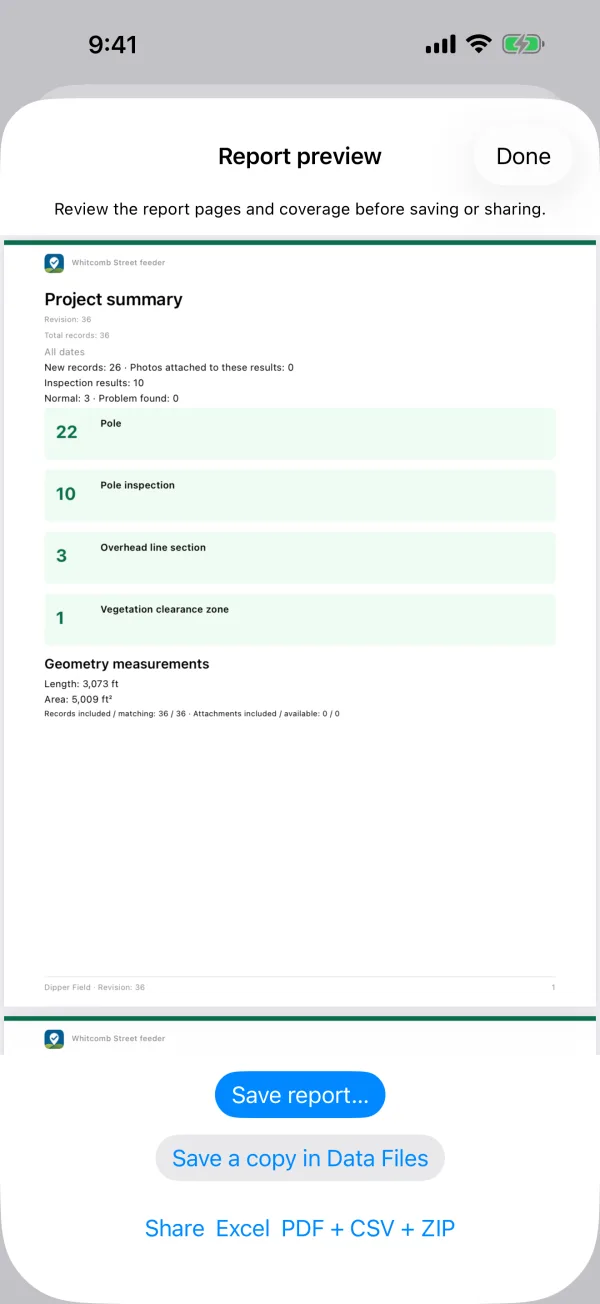
A PDF for the manager, a GeoPackage for the GIS team, a DXF for the engineer — from the same records.
- PDF reports — a project summary or one record in detail, with your logo, on Letter or A4.
- A CAD package — DXF drawing with layers and labels, attributes, photos and PNEZD points in one ZIP.
- Send it where it goes — OneDrive, Dropbox, S3-compatible storage, a network folder, email or AirDrop.
- Bring data in, too — GeoPackage, Shapefile, GeoJSON, KML, CSV and Excel.
- GeoPackage
- Shapefile
- GeoJSON
- KML / KMZ
- CSV
- GPX
- PNEZD
- DXF
For GIS pros
The details, in one place.
- Devices
- iPhone and iPad on iOS 16 or later · Android 9 or later on phones, tablets and foldables
- Geometry
- Points, lines, areas with holes and multiple parts · split, merge, edge tracing · snapping · vertex editing with a magnifier · offset points
- Coordinate systems
- 731 built in: 453 NAD83(2011) and NAD83 State Plane zones (m, ftUS, ft), WGS 84 and NAD83 UTM, ETRS89 UTM, national grids such as British National Grid, RD and LV95 · any EPSG code
- Heights
- NAVD88 (GEOID18), Alaska (GEOID12B), PRVD02, CGVD2013, ODN, NAP, DHHN2016 and more · NADCON5 · grids fetched from cdn.proj.org when needed
- GNSS receivers
- NMEA in, RTCM out · iOS: Bluetooth LE, Wi-Fi (TCP) · Android: Bluetooth LE, Bluetooth Classic (SPP), USB serial, Wi-Fi (TCP) · NTRIP with TLS · fixed-only gate · averaging · antenna height
- Offline maps
- Save areas of XYZ, WMS, WMTS and ArcGIS tile services (to zoom 17 or 19, up to 1 GB each) · import GeoPDF, GeoTIFF / COG and raster MBTiles
- Import
- GeoPackage, Shapefile (ZIP), GeoJSON, CSV, KML / KMZ, Excel (.xlsx) · reference layers up to 500,000 shapes each
- Export
- GeoPackage, Shapefile, GeoJSON, CSV, KML / KMZ, GPX, PNEZD / PENZD, DXF package (drawing, attributes, photos, offline viewer)
- Reports
- PDF on Letter or A4, with records as CSV and Excel and the original photos alongside
- Languages
- About 40 languages, including US, UK and Canadian English, Spanish, French, German and Portuguese
- Privacy
- No account · no analytics or advertising SDKs · no server of ours between you and your data
No account. No tracking. Your project is a file you own.
Projects live on your device and back up to a single file you can keep anywhere. When you connect a cloud drive, the provider handles the sign-in — we never see your password.
Read the privacy policy- Works without signing upInstall and start a project.
- No ads, no analyticsNo ad SDK or usage tracker in the app.
- Checked backupsEach backup is verified before it's saved.
- Crash reports stay putSent only if you choose to email one.
Questions
Is Dipper Field free?
Yes. Dipper Field is free to download and use, and needs no account. Offline maps will always stay free.
Does it work with no signal?
Yes. Projects, forms and photos are stored on the device, and maps you saved or imported work offline. The built-in Google maps need a connection.
Which GNSS receivers can I use?
Receivers that send NMEA over Bluetooth LE or Wi-Fi work on iPhone and iPad. Android also connects over Bluetooth Classic and USB. Receivers that only offer Bluetooth Classic to an iPhone aren't supported yet.
Do I need ArcGIS or another license?
No. Dipper Field works on its own, and its exports open in desktop GIS and CAD software.
Can my team share one project?
You can pass project backups and templates between people today. Live sync between colleagues isn't available yet.
Is it a surveying instrument?
No. It records field observations and the positions your device or receiver reports. It doesn't establish legal boundaries or replace a licensed survey.